
Projects: Slack

Accessibility Office Hours

Slack

PAC holds recurring Accessibility Office Hours with Slack, helping internal teams design and implement accessible features from the start, prevent regressions, and build company-wide accessibility knowledge through sustained, collaborative guidance.

Simplified Layout Mode
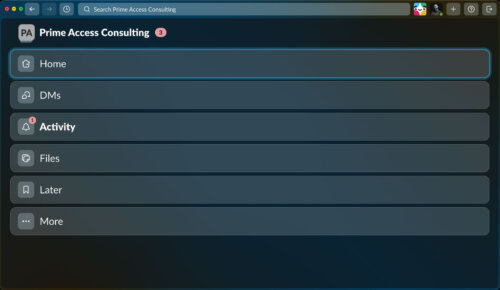
A Slack desktop application window in dark mode. At the top left, the workspace is labeled "Prime Access Consulting" with a small "PA" icon and a pink badge showing "3." A search bar across the top reads "Search Prime Access Consulting." The main view displays a large vertical navigation menu with rounded rectangular buttons. "Home" is currently selected and highlighted with a bright blue outline. Below it are "DMs," "Activity" with a small pink notification badge showing "1," "Files," "Later," and "More." The overall interface uses dark blue-gray panels, white text, and subtle icon buttons.
Slack

PAC helped Slack design and test Simplified Layout Mode, a desktop and web accessibility feature that reduces visible interface complexity, supports more linear navigation, and preserves core Slack functionality for users who benefit from greater focus, clarity, and access technology compatibility.

Verbosity Settings
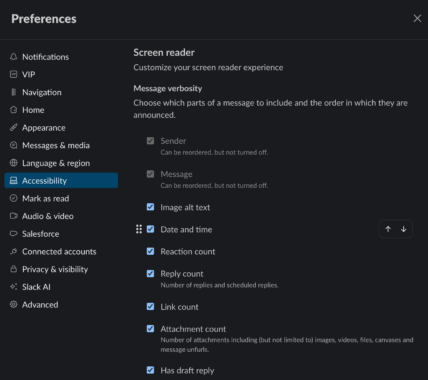
A screen shot of Slack's Preferences modal in dark mode. A left sidebar lists the settings categories and the main right panel displays the Screen Reader Accessibility settings. The left sidbar contains the categories: Notifications, VIP, Navigation, Home, Appearance, Messages & media, Language & region, Accessibility, Mark as read, Audio & video, Salesforce, Connected accounts, Privacy & visibility, Slack AI, and Advanced. The Accessibility section is highlighted in blue. The main panel is titled "Screen reader" with the subtitle "Customize your screen reader experience." Below, under "Message verbosity," it says, "choose which parts of a message to include and the order in which they are announced." Underneath Message verbosity are a series of nine customizable options. The first two checked options are greyed out, Sender and Message, with the text, "Can be reordered, but not turned off." Below are the checked options, Image alt text, Date and time, Reaction count, Reply count (with the sub text "number of replies and scheduled replies"), Link count, Attachment count (with the sub text, "Number of attachments, including but not limited to, images, videos, files, canvases, and message unfurls"), and Has draft reply. A small up/down reorder control appears on the right, and an X close button is in the top-right corner.
Slack

PAC supported Slack in designing, testing, and refining screen reader verbosity settings across desktop, mobile, and web apps, enabling users to reorder or disable message details for more efficient, customizable navigation.

Footer

Prime Access Consulting