
Verbosity Settings
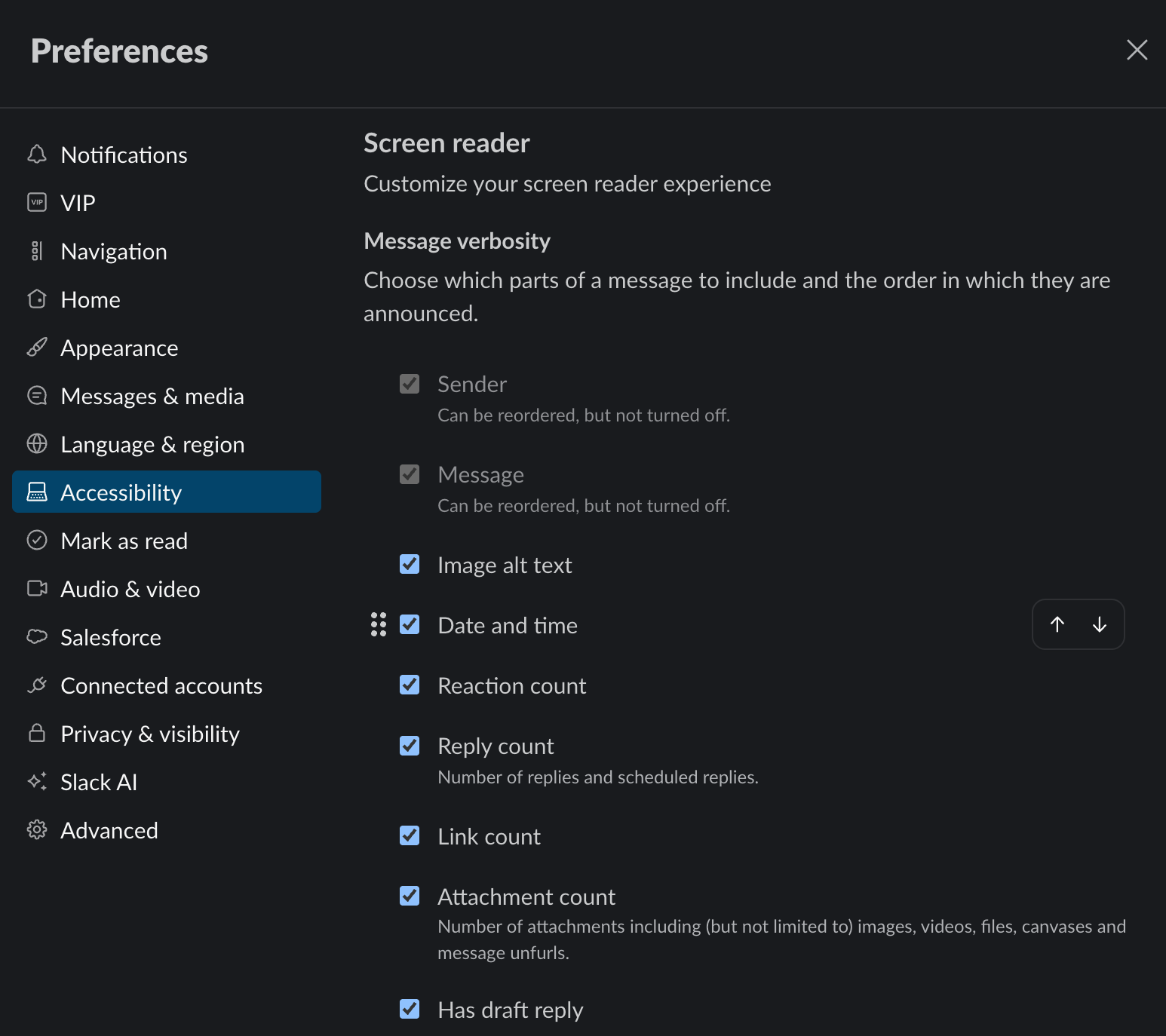
PAC supported Slack in designing, testing, and refining screen reader verbosity settings across desktop, mobile, and web apps, enabling users to reorder or disable message details for more efficient, customizable navigation.
Project Description
Some of the most inclusively designed systems are those that offer targeted customization, acknowledging that not everyone will experience or use them in the same way. Slack embraced this principle when they began adding screen reader verbosity settings to its desktop, mobile, and web apps.
“Screen reader verbosity” refers to the amount of information users receive about an entity or event, as well as the order in which that information is presented. In Slack, this can include details such as who sent a message, whether a message has replies or reactions, when it was sent, whether it includes attachments, and other contextual information that may or may not be useful to every person in every situation.
Many screen readers and operating systems already provide similar forms of customization. For example:
- Some screen readers provide short contextual help, often called “hints” or “tutor messages.” Many users reduce or turn these off entirely as they become more experienced with a particular device, application, or workflow.
- People can choose whether their screen reader should announce characters, words, both, or neither as they type. This setting is often adjusted on the fly depending on the activity or app being used.
- In ordered controls such as menus, screen readers can announce a user’s current position and the total number of items, such as “1 of 3.” Some people find this orientation useful, while others may find it distracting or unnecessary.
In Slack, where heavy users may interact with hundreds or thousands of messages in a day, controlling how much information is announced can significantly affect speed, focus, and comprehension. For example, some people may want to hear the reply count before anything else so that longer or more active threads stand out as they move through a channel. Others may prefer to prioritize the sender, the message body, or the time a message was sent.
Before this feature was implemented, users had basic control over the relative positions of the message body and the date or time it was sent within screen reader output. The new preferences extend that control by allowing various message components to be reordered or toggled off entirely. These include the sender, saved-for-later status, reaction count, presence and number of attachments, whether the user previously started drafting a reply, and more.
PAC’s Role
Prime Access Consulting (PAC) supported Slack in thinking through both the design and practical impact of these preferences. The work required balancing flexibility with usability: giving people meaningful control without creating a settings experience so fine-grained that it became difficult to understand or maintain.
PAC’s contributions included:
- Helping determine the appropriate level of granularity for the verbosity settings. For example, users can control whether attachments were announced overall, rather than being asked to manage separate settings for images, videos, files, and other attachment types individually.
- Working through important user experience decisions, including the choice not to automatically sync verbosity preferences across desktop and mobile. These are distinct environments with different usage patterns, and users may reasonably want different configurations for each.
- Testing, reviewing, and discussing the feature throughout its development, including early and experimental stages. This helped avoid the common antipattern of treating accessibility review as a checkpoint that happens only after major milestones have already been reached.
Testing and Rollout
The feature set was first rolled out to the A11Y Slack Community, participants in Slack’s Accessibility Ambassadors program, and internal users at Salesforce. This allowed Slack to gather feedback from people with direct lived experience using Slack with a screen reader, industry experts, and other accessibility allies.
After that testing and feedback process, the feature was made broadly available in December 2025.
Concluding Thoughts
Slack users know what information is relevant to them, and that relevance can change depending on device, task, context, and experience level. By giving users more control over what is announced, in what order, and in which environments, Slack made screen reader interaction more efficient without flattening the experience into a single assumption about how everyone should work.
For PAC, this project reflects a core principle of inclusive design: accessibility is strongest when it creates meaningful choice. The goal is not simply to expose more information, but to let people shape the experience so that the right information is available at the right time, in the right sequence, for the way they actually work.
It’s not an exaggeration to say that Slack’s message verbosity customization feature wouldn’t have happened without PAC’s expertise and collaboration. They were long-time advocates for the feature and helped us figure out every little detail along the way: from the name of the feature, to the user experience, to minute details about how every piece of metadata should be organized and read out. We couldn’t have asked for better partners, in this and all of our other accessibility efforts!
— Chris Xu, Director, Product Management at Slack